Crop Image Online
Free online photo cropper with precise aspect ratio control. Quickly crop images for avatars, social media covers, video thumbnails, prints, and more. Everything happens in your browser — fast, private and without quality loss. No registration required.
How to Crop a Photo Online for Free
Need quick and precise photo cropping? Our tool lets you crop images directly in your browser in seconds. It supports fixed aspect ratios and free crop mode — simple, clear, and without uploading files to any server.
- Click the upload area or drag and drop your image file.
- After the preview appears, choose Free Crop or a fixed ratio (1:1, 4:3, 3:4, 16:9, 9:16).
- Drag and resize the selection area to the desired position and size.
- Click “Crop & Download Free” — the image downloads automatically.
The entire process is simple, intuitive, and suitable for both personal and professional use.
⚡ Instant & Precise
Real-time cropping with professional Cropper.js engine. What you see is what you get.
🔒 Complete Privacy
Your photos never leave your device. All processing is 100% local.
📐 Popular Ratios
One-click aspect ratios: 1:1, 16:9, 4:3, 9:16 plus free crop.
🌐 Any Device
Works perfectly on phones, tablets and computers. Fully responsive.
🛡️ No Upload
Fully local processing. Maximum privacy guaranteed.
🎨 Theme Switch
Dark theme is default. Switch between light and dark with one click.
🖼️ Multiple Formats
Supports JPG, PNG, WEBP and GIF.
💾 No Watermarks
Clean files ready for immediate use. Download without any branding.
Instant & Precise Real-time cropping with professional Cropper.js engine. What you see is what you get. |
|
Complete Privacy Your photos never leave your device. All processing is 100% local. |
|
Popular Ratios One-click aspect ratios: 1:1, 16:9, 4:3, 9:16 plus free crop. |
|
Any Device Works perfectly on phones, tablets and computers. Fully responsive. |
|
No Upload Fully local processing. Maximum privacy guaranteed. |
|
Theme Switch Dark theme is default. Switch between light and dark with one click. |
|
Multiple Formats Supports JPG, PNG, WEBP and GIF. |
|
No Watermarks Clean files ready for immediate use. Download without any branding. |
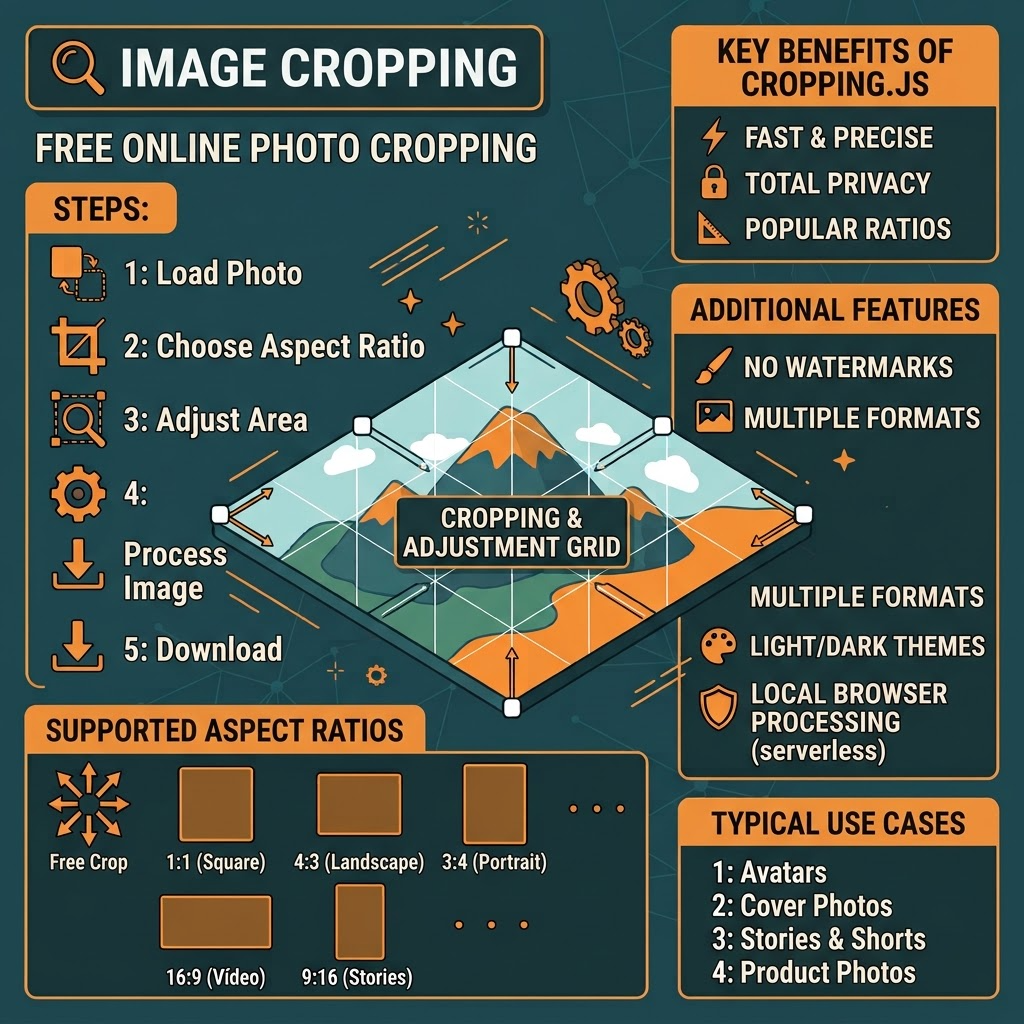
Key Benefits of Using This Tool
- Interactive cropping with drag & zoom support
- 5 most popular aspect ratios with one click + free crop
- Supports all common formats: JPG, PNG, WEBP, GIF
- Maximum file size — 10 MB
- Completely free, no ads or limits
- No registration or login required
- No watermarks
- Dark and light themes available
Typical Use Cases
Cropping images is one of the most common tasks in content creation. With this tool you can:
- Create square avatars (1:1) for profile pictures
- Prepare 16:9 landscape covers for videos or articles
- Crop 9:16 vertical content for short videos or mobile wallpapers
- Prepare 4:3 or 3:4 ratios for ID photos or printing
- Use free crop to remove unwanted backgrounds
- Prepare precise sizes for website images
- Crop product photos to the desired composition
- Create consistent ratios for presentations
Frequently Asked Questions
How does the online photo cropper work?
Upload your photo, choose free crop or a fixed aspect ratio, adjust the selection area, and click Crop & Download. Everything happens locally in your browser using Cropper.js. No images are uploaded to any server.
What aspect ratios are supported?
Free Crop, 1:1 (Square), 4:3 (Landscape), 3:4 (Portrait), 16:9 (Video), and 9:16 (Vertical).
Does cropping reduce image quality?
No. The tool preserves maximum possible quality. Output is saved in high-quality PNG format to retain detail and transparency.
Is the service free?
Yes, completely free with no registration, watermarks, or usage limits.
Are photos uploaded to a server?
No. All processing is performed locally in your browser. Photos never leave your device — complete privacy.
Is transparency supported?
Yes. PNG files retain full transparency after cropping.
Can I crop freely without fixed ratios?
Yes. Free Crop is the default mode. You can switch to any fixed ratio at any time.
Do I need to register or log in?
No. The service is completely free — no registration, no login, and no usage limits.
Are watermarks added?
No. Cropped images contain no watermarks.
Does it work on mobile phones?
Yes. The interface is fully responsive and works on smartphones, tablets, and computers.
How fast is the cropping process?
Because processing is local, most crops finish in just a few seconds depending on image size and device performance.
Can I crop multiple photos at once?
Currently one file at a time is supported. For multiple images simply repeat the process.
What is the name of the downloaded file?
By default the file is saved as cropped.png. You can rename it after download.
What should I do if cropping fails?
Check that the file is a supported image format, is under 10 MB, and that your browser supports Canvas. Refresh the page and try again.
Is a dark mode available?
Yes. Dark theme is enabled by default. You can switch between light and dark themes using the button at the top of the page.
Why use an online tool instead of desktop software?
No installation required, works on any device, instant processing, better privacy, and completely free — ideal for quick and occasional tasks.
Is the service secure?
Yes. Everything runs locally in the browser. Images are never sent anywhere and cannot be accessed by third parties.
Can I crop very high-resolution photos?
Yes, as long as the file is under 10 MB. Results depend on your device memory.
Can I edit the cropped photo later?
Yes. The downloaded file can be opened and edited in any image editing software.
What are the main use cases for this tool?
Perfect for avatars, covers, social media content, ID photo ratios, website images, product photos, and many other scenarios.
Professional Tips for Better Results
For optimal cropping results we recommend:
- Prefer 1:1 (square) for profile pictures and avatars
- Choose 16:9 for video covers or landscape content
- Use 9:16 for short videos or mobile wallpapers
- Keep PNG as the source format when transparency is needed
- Carefully check the selection area in the preview before cropping
- Always keep a backup of important original files
Online cropping is one of the most frequent image editing tasks. Whether you need an avatar, a cover, or want to remove unwanted backgrounds — this tool handles the job quickly and reliably.
Upload your image now, choose the ratio, and click Crop. In just a few seconds you will receive the result: no registration, no limits, and completely free.
Online tools are only the brush — real quality comes from attention to detail. You can always crop again until the result is perfect.
Crop photo online · Free image cropper · Crop picture online · Photo crop tool · Aspect ratio crop · 1:1 crop · 16:9 crop · Free crop · Square crop
About This Service
This online image cropping tool was created and is maintained by a Full-stack Python Developer and Computer Vision specialist. The goal is to provide a simple, fast, and privacy-focused way to crop images — without software installation and without account creation.
We place strong emphasis on privacy: all processing happens locally in the browser. Images are never sent to any server. The service is continuously improved based on user feedback. For suggestions or issues you can contact us via the email address in the author card.